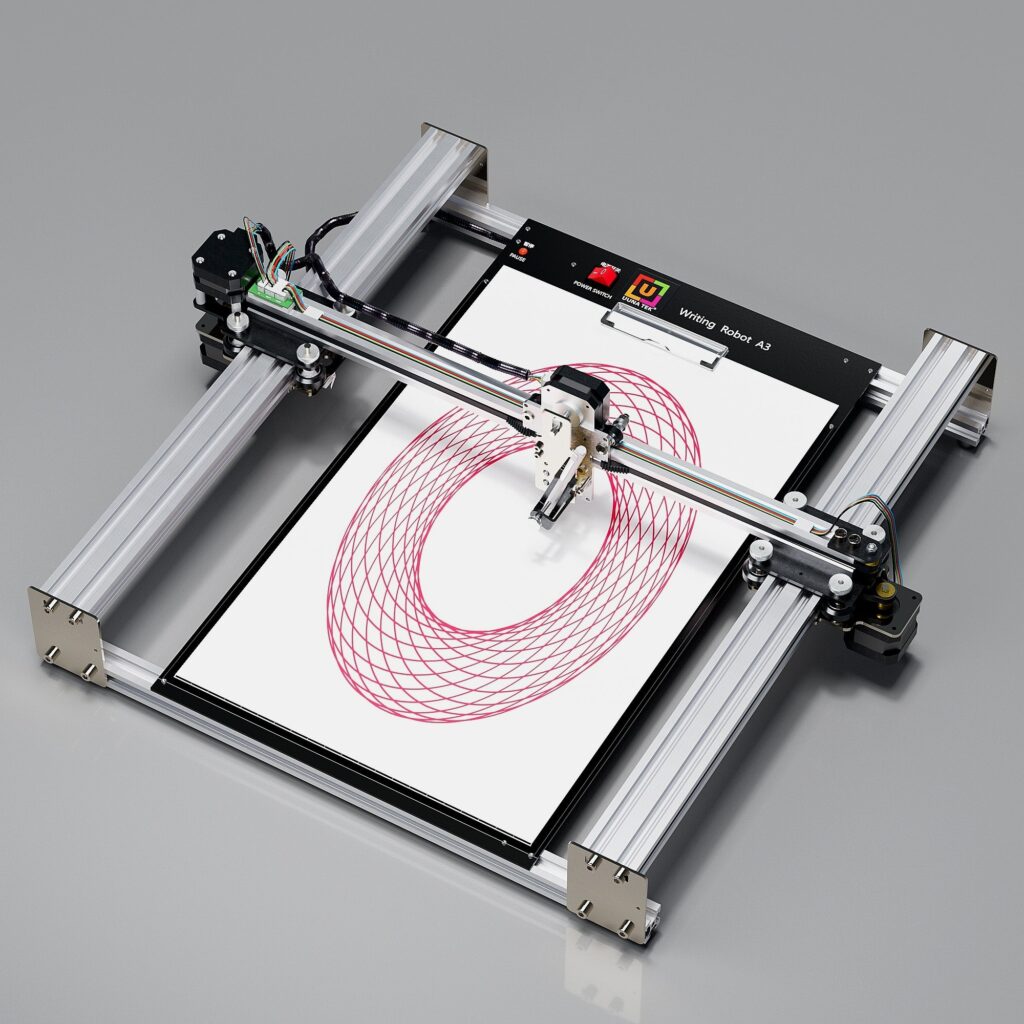
The UUNA TEK iDraw H A3 is an A3-size pen plotter. It moves a real pen along vector paths sent from your computer, a bit like a printer that draws with lines instead of pixels. It sits in the middle of the brand’s plotter range and is built around an H-shaped frame that the brand describes as stiffer than its standard one.
This is a research-based look. It draws on the brand’s spec sheets, FAQ and published policies, and it makes no claim of hands-on testing. Where the sources say nothing, the page says so instead of guessing.
The short version: the H A3 suits people who want an A3 machine with the brand’s H-frame for generative art, for copying a signature, or for lightweight layout work, and who are happy to spend a session on assembly. Skip it if you want a machine that works straight from the box. You can browse the whole range on UUNA TEK’s online store.
What the H-Frame Changes
The H in the name points to the frame. UUNA TEK says this structure is stiffer than the one on the standard iDraw 2.0, and that it makes the machine 300 percent faster than the brand’s earlier models. Here is how the spec sheet reads.
- Frame: an H-frame structure, which the brand describes as stiffer than the iDraw 2.0
- Speed: 500 to 600 characters per minute, according to the brand
- Motors: 4 stepper motors, where the original iDraw 1.0 used 2 servo motors
- Pen size: holds pens up to 10mm in diameter
- Pen types: fountain, rollerball and technical pens, permanent and whiteboard markers, and automatic pencils
- Software: free, with lifetime updates, covering an Inkscape extension set, command-line control and a Python interface
- Add-on: an optional laser engraving head, sold separately, that lets the same base machine cut and engrave wood, acrylic, leather and a few other materials

A small motor working against spring tension raises and lowers the pen. Because the mechanism does not push hard, pens that need heavy downward pressure, some ballpoints among them, are a poor fit.
One gap is worth knowing about. The brand gives no speed figure in inches per second for this model. It quotes characters per minute and a gain over its own older machines, so a direct speed comparison with other makers is not possible from the sources.
In the Box and Setup
Paper is held in place by a mounting base plate and magnetic blocks, and both come with the machine. So do a toolkit, a USB cable of roughly 6 feet and a universal power supply rated for 100 to 240V.
The plotter arrives partly assembled, so the last stage of the build is yours. UUNA TEK says plotting can begin about five minutes after that is done.
No coding is needed. The brand’s FAQ describes the normal routine as making a file in Inkscape and sending it to the plotter, with the command line and Python API kept as optional tools for automating jobs.
Plan a relaxed first session. Start with a simple drawing on cheap paper, check the lines, and adjust before you move on to a piece you care about.
What Stands Out Before You Buy
Instead of owner quotes, this section sticks to what the sources show.
On paper: a stiffer frame, free software for life, a laser upgrade path and parts that can be replaced one at a time rather than replacing the whole machine.
Rating on the brand’s site: UUNA TEK’s own product page for this model shows about 4.9 out of 5 from roughly 25 reviews. These are reviews hosted by the brand, not an independent source, so treat the number as a rough signal and not a verdict.
Trade-offs: you build part of it yourself, the pen limit is 10mm, and the warranty excludes damage from drops, extreme temperatures and water. It also covers only machines bought from UUNA TEK or an authorized reseller.
Before ordering, measure your desk and leave room around the machine, since a plotter usually needs more space than the paper alone.
How It Compares With NextDraw
AxiDraw, from Evil Mad Scientist, has been discontinued, and its maker points buyers to the NextDraw from Bantam Tools. The NextDraw 1117 is the A3-class model, so it is the natural one to set beside the H A3.
| Spec | iDraw H A3 | NextDraw 1117 |
|---|---|---|
| Price | Check the current price at UUNA TEK | about $1,349 |
| Assembly | Partly assembled, finished by the owner | Arrives built |
| Pen capacity | Up to 10mm | Up to 5/8 inch (16mm) |
| Laser engraving | Optional add-on | Not supported |
| Extras | Laser head available | Brushless pen-lift motor, auto-homing |
| Software | Inkscape, command line, Python API | Inkscape, command line, Python API |
The NextDraw’s higher price buys real convenience. It arrives fully built and homes itself, and the brand lists a top speed of 15 inches per second across X and Y, a figure carried over from the AxiDraw design. The iDraw H A3 trades that convenience for a lower price and the laser upgrade path.
On software the two are close. The brand’s iDraw H SE is the variant built to run AxiDraw-compatible software, so scripts written for AxiDraw or NextDraw may need only small changes.
If you want a plotter that is ready as soon as you open the box, the NextDraw is the safer pick. If budget matters and a short build does not bother you, the H A3 offers most of the same capability for less.
Where It Sits in the Lineup
The brand sells four lines. Where a price is shown below, it is rounded from UUNA TEK’s listing and may change. For the two entry models, check the current price at UUNA TEK.
| Model | Price | Suited to |
|---|---|---|
| iDraw 2.0 A4 | Check the current price | First plotter, small drawings |
| iDraw H A3 | Check the current price | Generative art, larger sheets |
| UUNA TEK 3.0 A3 | from about $1,070 | Preassembled, wireless workflow |
| iAuto Standard | from about $2,999 | Handwritten mail at business scale |
The H line also comes in A2, A1 and A0 sizes, and an SE variant that starts at about $974. The 3.0 line is preassembled and adds WiFi and SD card support, so you are not tied to a laptop while it draws.

The iAuto is a different kind of machine. It writes and addresses real letters with an auto-feeder, which suits businesses mailing handwritten pieces in volume. If you only want to draw, it is not the right line.
Price, Shipping, Returns and Warranty
Check the current price of the H A3 at UUNA TEK before you order, since prices on the store move from time to time.
Shipping: free worldwide on machines and accessories. Processing for iDraw A-series plotters runs from 2 business days to 2 weeks. Air delivery takes about a week, and sea delivery a month or longer.
Returns: a free return with a full refund is offered if you act inside 30 days and the cause is a confirmed quality problem or carrier damage. You email support first and include a video of the connections and settings. Other returns cost you the shipping, and the refund shrinks with the item’s condition: a deduction of up to 10 percent when repacking is required, and up to 90 percent when the item returns damaged.
Warranty: 12 months against manufacturing defects, with free replacement stepper motors, servo motors, sliders and plates. Drops, extreme temperatures and water void it, and a claim for a given defect lapses 90 days after you open it. The brand’s returns terms also ask you to contact support before sending anything back.
FAQ
Which pens work with the iDraw H A3?
The brand’s list covers fountain, rollerball and technical pens, permanent and whiteboard markers, and automatic pencils. The limit is a 10mm diameter, and the pen should not need heavy downward pressure.
Is coding required?
No. According to the brand, the usual workflow is to draw in Inkscape and send the file across. The command line and the Python interface are there for scripting jobs, and you can leave them alone.
Can it reproduce my signature?
The brand says it can. A phone or tablet does the recording first, and the plotter then draws the saved signature back out.
Which parts wear out over time?
The brand names four parts: belts, wheels, bearings and stepper motors. Each one is replaceable separately. If the carriage grinds or feels loose, a wheel or bearing is the likelier culprit than a dead machine.
Where should I buy it?
From the brand’s own websites, uunatek.com or idrawpenplotter.com, or from a reseller the brand authorizes. The warranty only covers authorized purchases, so keep your order confirmation.
The Verdict
The iDraw H A3 makes sense for someone who wants an A3 plotter with the brand’s stiffer H-frame, priced below the NextDraw 1117, and who does not mind assembling it. The software stack is open, the parts are replaceable and the laser head offers a path beyond drawing.
It is a weaker fit for anyone who wants a machine ready to run on day one, or who needs pens thicker than 10mm. In those cases the NextDraw or UUNA TEK’s preassembled 3.0 line may suit better. To compare sizes and check the current price yourself, browse UUNA TEK’s range on the brand’s own store.